
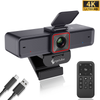
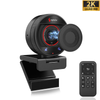
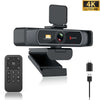
 967Ultra
 Angetube 913Ai
 Angetube 866MAX
 Angetube 914Max
 PTZ 4K 871Ai
 Angetube @30fps 863Plus
 Angetube @60FPS 873Ai
 Angetube 967Pro
 Angetube 967
 Angetube 862Pro
 Angetube 680C
 Angetube 920
 Angetube 963
 Angetube 962
 Angetube 925c
 862Pro
 863PLUS
 913AI
913AI


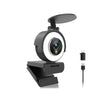
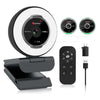
The Angetube 962 is a 1080P streaming webcam with built-in ring light and 5-level digital zoom, perfect for Twitch streaming, gaming, and video calls. It features touch-controlled 3-level adjustable fill light, real-time autofocus, beauty enhancement, dual noise-canceling mics, wide compatibility including Xbox and Windows systems, and optional official software for custom filters and settings.
 Immerse Yourself in a Smooth Streaming Experience with Our 1080P HD Webcam/Capture every moment with our live stream cam, engineered for high-quality broadcasting and seamless live streaming, ensuring your audience gets the best visual experience.
 Customize Your Lighting with Ease: 3-Level Adjustable Ring Light with Touch Control/Master streaming your webcam to a browser with Python. Our guide shows you how to seamlessly integrate Python's capabilities for real-time webcam broadcasting in web applications/camera ring light
 Enhance Your Visuals with a 5-Level (2X) Zoom Feature, Allowing You to Get a Closer Look and Capture Every Detail with Precision and Clarity
 Experience Fast and Accurate Autofocus for Crisp Visuals and Effortless Clarity/Explore our selection of good cameras for streaming, offering high-definition clarity and reliable performance to elevate your live broadcasting experience
 Enjoy Exceptional Audio Quality in Any Environment with Our Noise-Canceling Technology
 Elevate Your Streaming Experience and Shine a Spotlight on Your Content with the Exceptional Quality of Our Webcam
 Amplify Your Streaming Experience and Unleash Creativity with Background Replacement
 Seamless Streaming Even in Low Light: Benefit from Automatic Low Light Correction with Our High-Quality Webcam
 Perfect for Video Familiarity, Distance Learning, and Video Conferences: Experience Unmatched Quality/Enhance your Xbox gaming streams with our specialized Xbox streaming camera, designed for high-quality broadcasting and seamless integration with your gaming setup
 Simplify Your Experience with Easy Plug and Play Setup, No Hassles Required
 Enjoy Universal Compatibility for Effortless Integration with Your Devices and Software
 Unlock Enhanced Control with Angetube Webcam Software for a Seamless Experience/Experience the ultimate streaming quality with our full 1080p HD camera, perfect for delivering crystal-clear, high-definition video in all your live streams/Capture every moment with our streaming video camera, designed for a flawless 1080p stream, delivering high-definition content that engages and entertains.
Frequently Asked Questions
Can I zoom in with this webcam during calls or streaming?
Yes! The 962 has 5-level digital zoom you can control directly with the button on the camera body, up to 2X magnification, even on Mac OS. You can zoom in to focus on details or zoom out for a wider view without touching any software.
How do I adjust the ring light brightness?
The ring light is controlled by touch directly on the camera - no need to open any software. Just tap the touch area on the front to cycle through 3 brightness levels, or turn it off completely, for perfect lighting even in dim rooms.
Does this webcam work with Xbox for game streaming?
Yes, the 962 is compatible with Xbox One, as well as Windows XP/7/8/10/11, Mac OS 10.6+, Chrome OS, and Linux. It works with all major streaming and call software including OBS, Twitch, Zoom, Teams, Skype, and Facebook Live.
Can I adjust camera settings like exposure or add filters?
Yes, you can download the free official Angetube software to adjust exposure, white balance, resolution, and add beauty filters and effects. It also works as a virtual camera for Zoom, Teams, and other software.
Does this webcam have a microphone?
Yes, it has dual built-in noise-canceling microphones that reduce background noise and pick up your voice clearly, even in noisy environments, perfect for streaming and group calls.
Can I rotate or angle this camera?
Yes, it supports 360° horizontal rotation and 100° vertical tilt, so you can adjust it to any angle you need. It also clips securely to monitors and laptops, and works with standard tripods.
Specifications
| Video Resolution | 1920x1080,1280 x720,640x480 etc |
| Frame Rate | 1080p@30FPS/sec |
| lmage sensor | 2.0M,1/2.7 inch |
| Format | JPEG,YUY2 |
| Aperture F value | F/N2.0 |
| View Angle | 78 degree, Vertical distortion-free |
| Private shutter | No |
| Focos method | Auto focus (AF) |
| MIC | 35db+ high sensitivity,SNR65d2 signal-to-noise ratio2-channel stereo noise reduction dual MIC,3m longdistance pickup clear and natural. |
| Light | Touch 3 levels brightness beauty fill-in light, Shimmer/Medium light/ Glare |
| Tripod | available to use camera tripod,suitable for desktopplacement,laptop, LCD or CRTmonitor |
| System Compatible | Windows XP/ SP2 /7/ 8/10; Mac OS 10.6; Linux 2.6.24 Chrome OS 29.0.1547.70/, XBox One; Ubuntu |
| App | ZOOM, Skype, FaceTime, Hangouts, WebEx.OBS, Facebook , YouTube, Teams ,XSplit etc |
| Configuration requirements | 2.4GHZIntel Core2 DuoProcessor or higher 2GB of ram orhigher,USB2.0 port (USB3.0 is required for 4K products) |
Reviews
Download
FAQS
During a google/zoom meeting if you turn off your camera via the browser will the mic keep working?
Yes. The mic and camera are separate components on the camera and can be selected as such in zoom meetings.
You can use one, both, or none at all.
what is the minimum focal distance?
7cm,The webcam is auto focus
Is it possible to turn off autofocus? It is way over-sensitive.
sorry, this model can't turn off the autofocus
How do I install a webcam on my computer?
Connect the webcam to a USB port; your computer should automatically install the necessary drivers.
How does the resolution of my webcam affect video quality?
The higher the resolution, the clearer the video. Common high-definition resolutions are 720p and 1080p.